
Add all your company information that can be stored, accessed, and retrieved in Safety PAL main account portal.
What is this?
The individual user’s Dashboard automatically details documents that have expired
You can simply renew any document and Safety PAL will archive the superseded document.
Renew your company document:
Click Renew of the document you require to replace from the right-hand side of the expiry section of your DashBoard
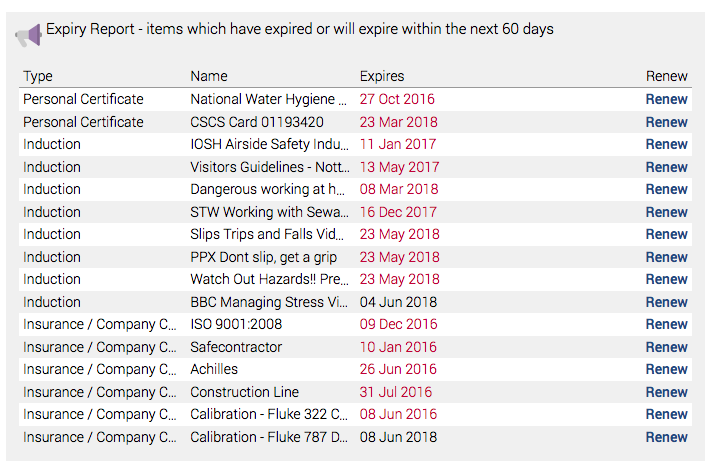
You will then be asked to ‘add new certificate/document
Complete the on-screen details and click browse to choose your file
(we recommend you always use a PDF as this is universal for every type of device used to access documents)
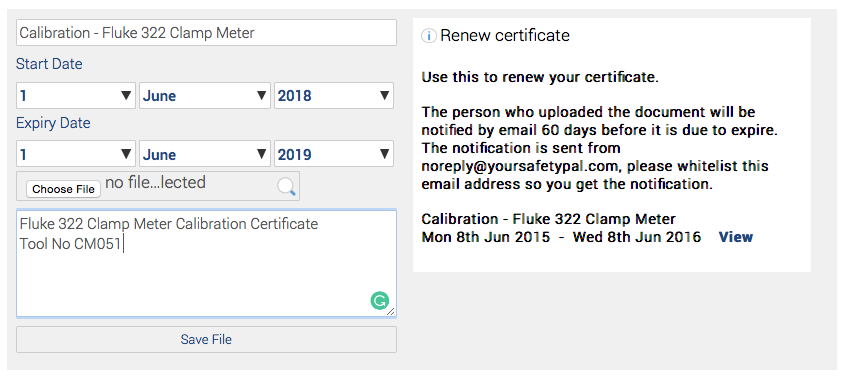
Click the ‘Save File’ button and Safety PAL will archive the old document, remove the notification from the dashboard Expiry Report and add the new document.
You can view all archived documents by accessing your main company account, scroll down and you will see the button ‘View Archived Documents’

Click to show all archived documents

The newly uploaded certificate is also shown in your list of company documents
