
Logging into Safety PAL
Step 1:
In order to access your Safety PAL cloud-based smart app, you need to log in!
The screen below shows the login screen you are first presented with when going to https://app.yoursafetypal.com
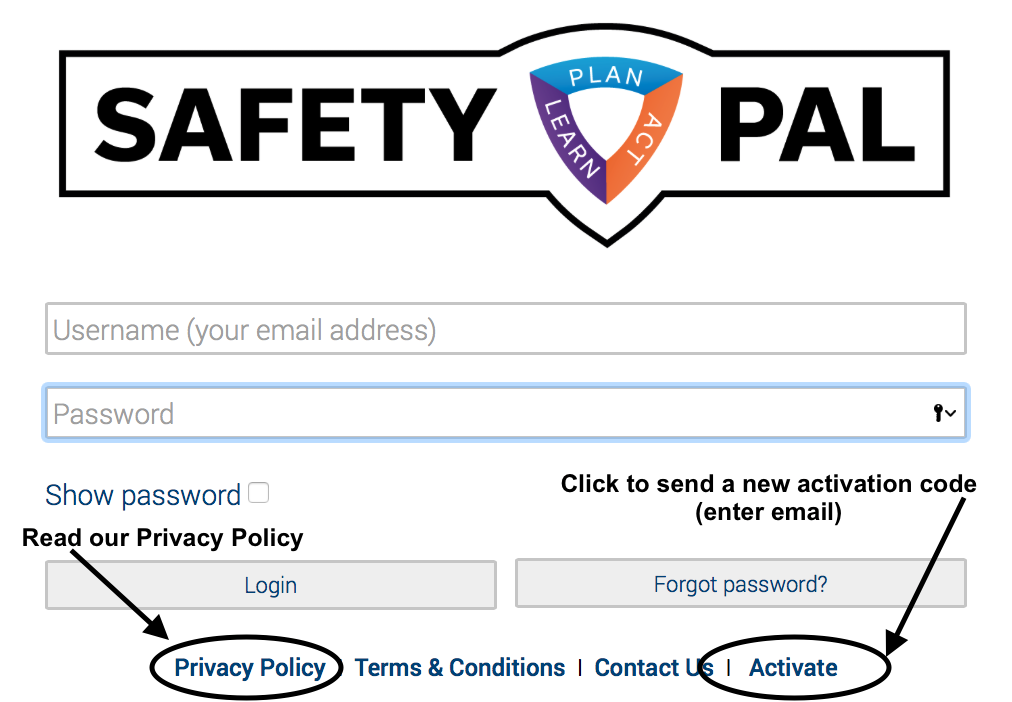
- Type in your Username (your original email address)
- Enter your password (use the ‘Show password’ check box to reveal)
- Click Login
If you have forgotten your password, use the ‘Forgot Password’ button and Safety PAL will send you a new link to reset your password.
You also read our Privacy Policy, Terms & Conditions, Contact us, or re-send an Activation code.
Step 2:
Activation Code:
When you add a user for the first time, they will receive an activation code from ‘noreply@yoursafetypal.com’
If they have lost this link (Spam, Clutter or Trash), you have the ability to re-send another activation code. This activation code has a 2 hour time out, so only use when you can advise the user you are sending another activation code.
When you click ‘Activate’, you will be asked to type in the users email address.
RE-SENDING A NEW CODE SUPERSEDES any previous code.