
You are required by law to investigate individual risks in and around your workplace and add control measure individually, to fully ensure adequate measures are correct for the task.
Safety PAL has an inbuilt Risk Database tool, allowing you to create individual risks that you can add to your job as a Risk Assessment. Our unique tool uses the 5×5 scoring mechanism; input your evaluation score and Safety PAL will calculate your risk score.
Add Risks
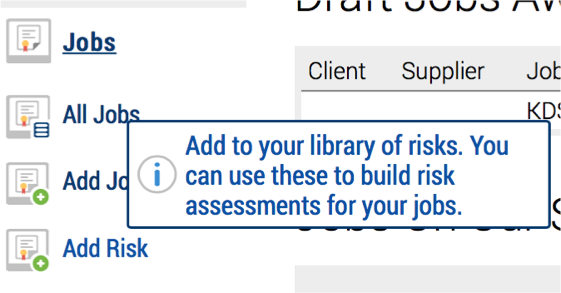
From the left-hand menu, click Jobs and then under the job submenu click Add Risk to gain access to your risk database.
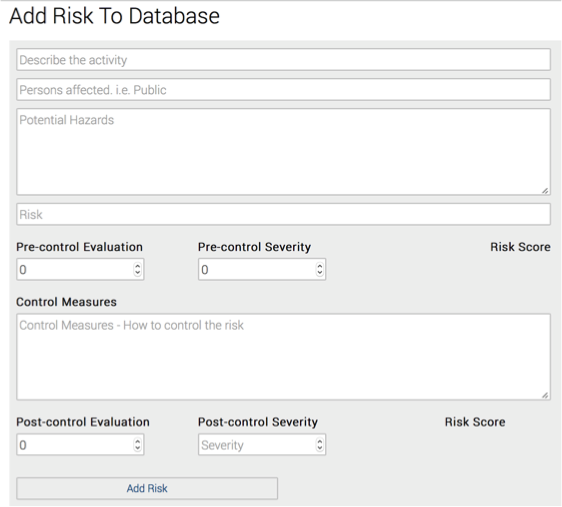
When specifying your assessed risks:
- Ensure the title is descriptive and accessible
- Select persons which may be affected
- Outline potential hazards, ie “Vehicle Traffic”
- Highlight the exact risk top the persons affected, ie “Injury to operative”
Pre and Post Control Evaluation Scores
Add your Pre-Control evaluation score (how likely is it to happen) and your Pre-Control Severity score (how bad would it be if it happened). See the table below for a guide to the scoring.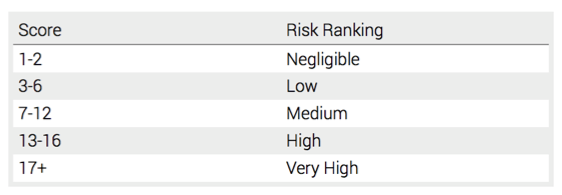
Safety PAL will calculate your risk score.
Next, outline the Control Measures you will take to reduce both the risk and severity. Add more control measures in order to lower the post score to then get a negligible or low risk.
With these measures in mind, give the activity a new Post-Control evaluation score and a new Post-Control Severity score to receive your new Risk Score.
When finished, click Add Risk to save your new risk.